Icon sets are usually closed. You can use them, but you cannot easily add the one icon you are missing, and an AI that writes SVG by hand tends to produce shapes that float, overflow or clash with everything around them.
There is a way to make that work. In Levni, a drawing is a small JSON file: SVG path data in a 100 by 100 box, with colours given as names. Levni inks the drawing by hand and recolours it for any style. A chat model can write that JSON, one command checks it, and a pull request puts it in the shared library. The library is CC BY 4.0, so what you add is free for everyone to use with credit.
This guide takes you from an idea to a merged icon. It costs nothing, and you need Node 20 or newer and a git checkout of the repository. No API key is needed to check or draw props.
Learn the prop format
Every drawing is one file in library/props/. This is the example from the contributing guide:
{
  "name": "watering-can",
  "category": "home",
  "tags": ["garden", "water", "sulama"],
  "author": "Your Name",
  "variants": [
    { "note": "side view, spout to the right", "paths": [
      { "d": "M20 40 L70 40 L66 86 L24 86 Z", "fill": "tone", "stroke": "ink", "weight": 9 },
      { "d": "M70 52 L92 30", "stroke": "ink", "weight": 9 }
    ] }
  ]
}
The rules in short:
nameis the file name: lowercase English,a-z0-9and hyphens.tagscan be in any language.categoryis one of 15 shelves: film, tv, stage, music, books, tech, money, law, sport, home, food, nature, places, health, symbols.- Draw in a 0 to 100 box. Y grows downward. Centre the object so it fills 70 to 85 of the box.
- Colours are names, never hex:
ink,blue,tone,coral,tone-coral,mustard,tone-mustard,green,tone-green,paper,white,dark. weightis the line width in output pixels: 8 to 10 for outlines, 4 to 6 for details.
Names are the point. Because a drawing says coral and not #FF5A36, a style pack can recolour it later: see recolouring a library in your brand colours.
Ask a chat model to write the props
You do not have to write path data by hand. The repository has a copy-paste prompt in docs/prop-prompt.md. The loop is:
- List the objects you want, 15 to 20 per batch, in
docs/props-template.csv(name, tags, what it looks like). - Paste the prompt from
docs/prop-prompt.mdinto any chat model (ChatGPT, Claude, Gemini or a local one), then paste your rows under it. - Save the whole answer as a file such as
batch-01.txt. Code fences are fine.
Here is a short version you can paste into Claude or Codex when you only need one or two icons:
Read docs/prop-prompt.md in this repository and follow it exactly.
Draw these objects as Levni props:

hourglass-half, "time; wait; zaman", sand timer from the front, half the sand in each bulb
sprout, "plant; growth; filiz", a seedling with two leaves in a small pot

Give each object a simple side or front view. Save the answer to batch-01.txt.
Then run: npx levni add batch-01.txt --sheet batch-01.png
and tell me which props the check rejected and why.
Chat models are good at simple objects and weak at complex ones (animals, vehicles, hands). Ask for the plain side or front view of a thing, and expect a few drawings per batch to need a second try.
Import the batch and look at it
npx levni add batch-01.txt --sheet batch-01.png
add checks every prop, writes the good ones to library/props/, adds new variants to props that already exist, and lists the broken ones. The --sheet option draws everything it imported, every variant on paper and on a blue panel, so you can see it. Open batch-01.png and look at each drawing the way a reader would: is the object recognisable at 120 pixels? Do the shapes join? Is anything floating?
Send the broken or ugly ones back to the same chat with what is wrong (“the handle floats”, “too thin”) and import the fix the same way. Delete what you do not want from library/props/.
Read the numbers from levni check
If you work with an agent that cannot see images, or you simply want proof, check measures a prop without looking at it:
npx levni check battery wifi
For each variant it prints a line like this:
battery#3 size 86 centre (51,51) colours paper,ink ok
That reads: variant 3 fills 86 of the 100 box, its centre is at 51,51, and it uses paper and ink. When something is wrong it adds a fix: line, for example:
arch-gate#0  size 100  centre (50,54)  colours mustard,paper,ink,white
   fix: too big: fills 100 of 100, keep it inside 4..96; runs outside the 0..100 box
The checks cover size (keep it inside 4 to 96), centring, and the number of accent colours (at most two). Run levni check with no names to measure the whole library. A new prop should say ok on every variant.
Add state variants, not new props
A second angle or state of the same object is another variant of the same prop. The battery prop is a good model. It has six variants, and four of them are levels:
| Variant | What it shows |
|---|---|
| 3 | horizontal, empty: three empty slots |
| 4 | horizontal, low: one coral bar |
| 0 | horizontal, two green charge bars and one empty slot |
| 5 | horizontal, full: three green bars |
The wifi prop does the same with signal strength: variant 3 lights only the inner arc, variant 4 two arcs, and variant 0 shows the full signal. The note on each variant tells a person or an agent what it shows, and the Library and list_props search that text.
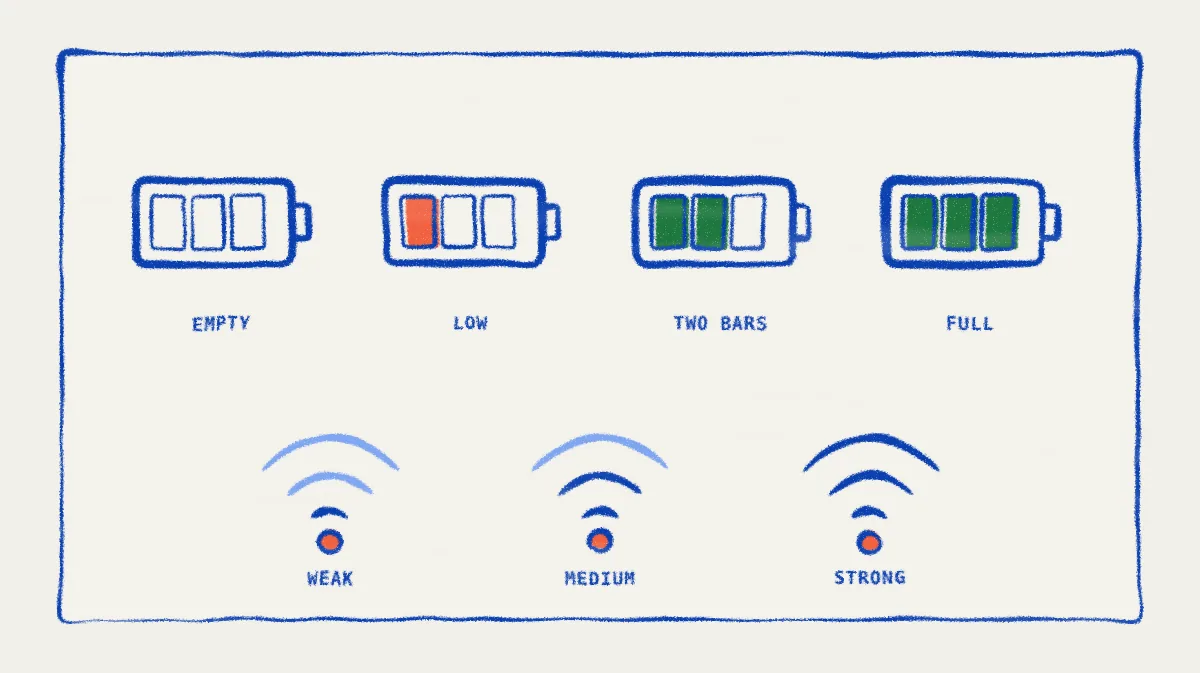 A contact sheet of state variants: battery 3, 4, 0 and 5 above, wifi 3, 4 and 0 below.
In a scene you pick a state with the variant field:
{ "type": "prop", "name": "battery", "variant": 4, "x": 600, "y": 336, "size": 320 }
This is why states belong in one file. An interface that shows “battery low” asks for "variant": 4 and does not need a new drawing. The same trick works for open and closed, full and empty, day and night.
Test the drawing at the sizes people will use
An icon that works large can fall apart small. Place the same prop at a large size and at the sizes it will actually appear, then look at them side by side.
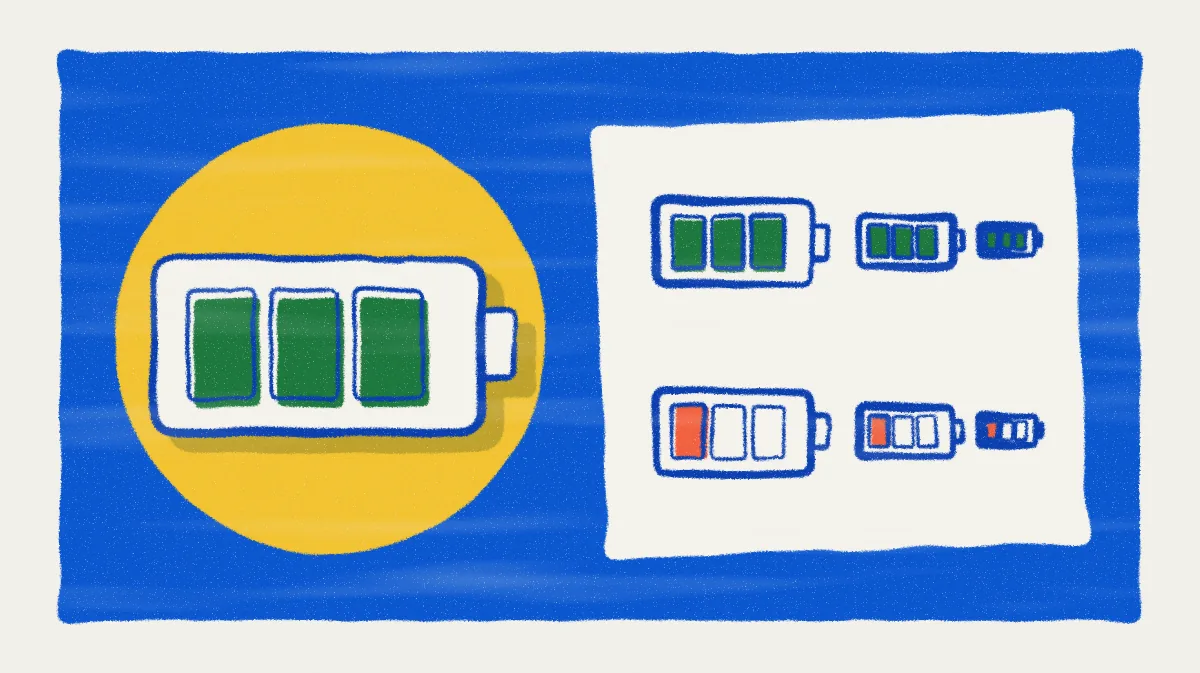 One drawing large, and the full and low variants again at three smaller sizes.
At the smallest size the bars still read as bars and the coral one still reads as low. If details vanish, thicken the weight of the inner lines (stay between 4 and 6) or remove a detail. The house rule is simple shapes, two inks plus paper, readable at 120 pixels.
Follow the review rules
Before you open a pull request, check your drawing against the five rules in CONTRIBUTING.md:
- Own work only. Drawn by you. Drawing in the spirit of a tradition is welcome. Tracing a specific work, photo, stock image or icon set is not. AI-assisted path code is accepted when you directed and checked it: say so in the pull request.
- No faces, no hands. People appear only as faceless pictograms.
- No logos or trademarks, and nothing that reads as one.
- One object, one idea. No text inside drawings, no scenes.
- House style. Simple shapes, two inks plus paper.
Open a pull request
Run the checks, then send the change:
npm install
npx levni check my-prop
npm test
npm test validates and renders the whole library. Then fork the repository, commit your files in library/props/ and open a pull request that says what you drew, which tool wrote the paths, and attaches the contact sheet. By submitting you release your drawing under CC BY 4.0 and you are credited in its author field. Code changes are separate: they are MIT licensed and npm test must pass.
What to do next
Browse the Levni library first to see what already exists, so you draw what is missing. Then read free illustrations for commercial use for what the licence means for people who use your drawing. To see your icons inside a finished image, follow generate blog covers with Claude Code.
Related: any icon you draw this way can also become a 3D icon, see free 3D icons. For a ready set in a pixel style, see free pixel art icons.
FAQs
What is the icon JSON format?
One file per prop with a `name`, a `category`, `tags` and a list of `variants`. Each variant has a `note` and a list of `paths`, and each path has SVG path data `d`, a `fill` and `stroke` given as colour names, and a `weight`. Everything is drawn in a 0 to 100 box.
Can I create SVG icons with AI?
Yes. Levni ships a prompt in `docs/prop-prompt.md` that tells any chat model how to write props. Paste your list of objects under it, save the answer and run `levni add` to check and import it. Expect to retry a few drawings per batch.
How do I know an icon is good before I submit it?
Run `levni check` on it. It measures how much of the box each variant fills, where its centre is and which colours it uses, then says what to fix. `levni add --sheet` also draws every variant on paper and on blue so you can look.
Can I add a different state of the same icon?
Yes, as another variant of the same prop, not another prop. The battery prop has empty, low, two-bar and full variants, and the wifi prop has weak, medium and strong.
What licence do contributed drawings get?
CC BY 4.0. You are credited in the prop file's `author` field, and anyone can use the drawing, including commercially, as long as they credit it.