
Articles about work, health, money and cities all need people in the picture. Stock photos bring real faces with real ages, genders and expressions that the story never asked for. Detailed character illustrations take time and drift in style from one artist to the next. And an image model can produce a face that looks uncomfortably like someone real. That is why so many publications turn to faceless people illustrations.
A faceless figure solves most of that. A round head with nothing on it, a rounded body and thick inked limbs read as “a person” and nothing more. Levni, an open illustration engine, draws people only this way, by design: one person in fifteen poses, people in a group, a crowd seen from behind, and isotype pictograms for shares.
This guide draws each of them from JSON and explains when to use which. It runs on your machine with Node 20 or newer; there is no account, no API key and no cost per image.
Know why the faces are missing
Leaving out the face is a choice, and it does three jobs:
- It stands for anyone. A reader sees a person doing something, not a particular age or background. That suits explainers, data stories and service pages, where the person is the reader.
- It cannot be anyone real. Levni does not draw real people. A faceless pictogram can never be mistaken for a politician, a victim or a colleague.
- It stays consistent. The same body and line across hundreds of covers is part of what makes a publication look like one publication. The story of one style across 500 articles shows what that looks like over time.
The library’s own drawings follow the same rule: no faces, no hands. People appear only through these elements.
Draw one person in a pose
Install Levni from GitHub (it is not on npm yet):
npm install github:BoraGkc/levni
A person needs a position, a size and a pose:
{ "type": "person", "x": 300, "y": 590, "size": 340, "pose": "reading", "color": "paper", "accent": "coral" }
x and y are the feet, centred: the feet always land on y, so a row of people with the same y stands on the same ground. size is the height. facing is right by default; left flips the figure. color is the body, accent adds a scarf in that colour (or a bag, with "accentKind": "bag").
These are the fifteen poses, drawn by a scene with one person per pose and a label under each:
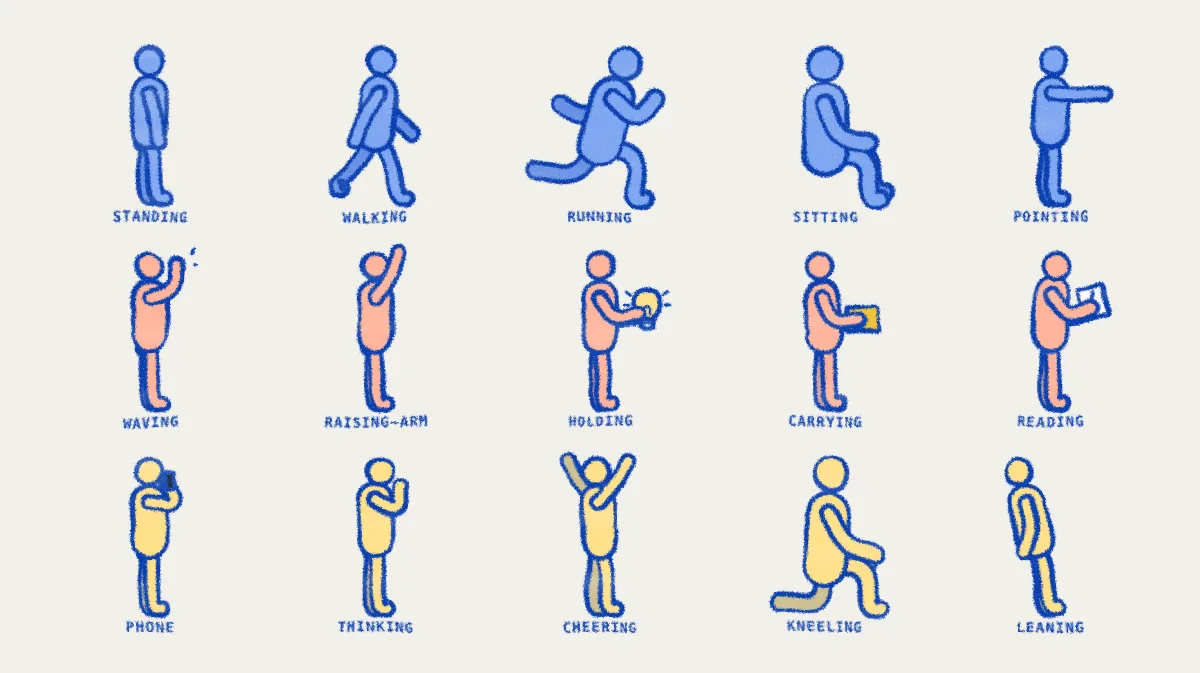 All fifteen poses at 150 px tall. Blue, coral and yellow tones by row.
A few poses take extra fields:
| pose | extra |
|---|---|
holding |
hold: a library drawing drawn small at the hands, such as "lightbulb" |
carrying |
a box, coloured by itemColor |
reading |
draws a book |
phone |
the arm goes to the ear; "phone": false hides the handset |
sitting |
sits on an implied seat; draw the chair yourself |
leaning |
leans back on an implied wall; draw the wall yourself |
thinking and leaning are the weakest at small sizes; keep them above about 150 px. On a blue panel, use "color": "paper" or a light tone so the figure reads.
Put people around an idea
People work best when they do something with an object. The cover of this post is two persons and one newspaper:
{ "seed": 52, "clip": [60, 52, 1080, 569], "elements": [
  { "type": "panel", "x": 60, "y": 52, "w": 1080, "h": 569, "color": "blue" },
  { "type": "disc", "x": 600, "y": 300, "r": 190, "color": "mustard" },
  { "type": "prop", "name": "newspaper", "x": 600, "y": 290, "size": 250, "rot": -6 },
  { "type": "person", "x": 300, "y": 590, "size": 340, "pose": "reading", "color": "paper", "accent": "coral" },
  { "type": "person", "x": 880, "y": 590, "size": 320, "pose": "pointing", "facing": "left", "color": "coral" },
  { "type": "hills", "base": 621, "height": 50, "color": "tone", "period": 300 }
] }
The object is the focus and the people point at it, read it or carry it. That is also the house rule for any Levni cover: one clear focal object, at least 220 px, with everything else serving it.
Draw a group with people
For a conversation, a team or a queue, use people. It spreads n persons along a line from x to x + w, with slight variation in height and position, and cycles through your lists of poses and colours:
{ "seed": 53, "elements": [
  { "type": "bubble", "x": 380, "y": 90, "w": 200, "h": 120, "tail": "left", "content": "lines" },
  { "type": "bubble", "x": 640, "y": 110, "w": 180, "h": 110, "tail": "right", "content": "heart", "color": "tone-coral" },
  { "type": "people", "x": 160, "y": 600, "w": 880, "n": 5, "size": 260,
    "poses": ["phone", "pointing", "standing", "waving", "holding"],
    "colors": ["tone", "coral", "paper", "mustard", "tone"], "accents": ["blue"], "hold": "coffee-cup" }
] }
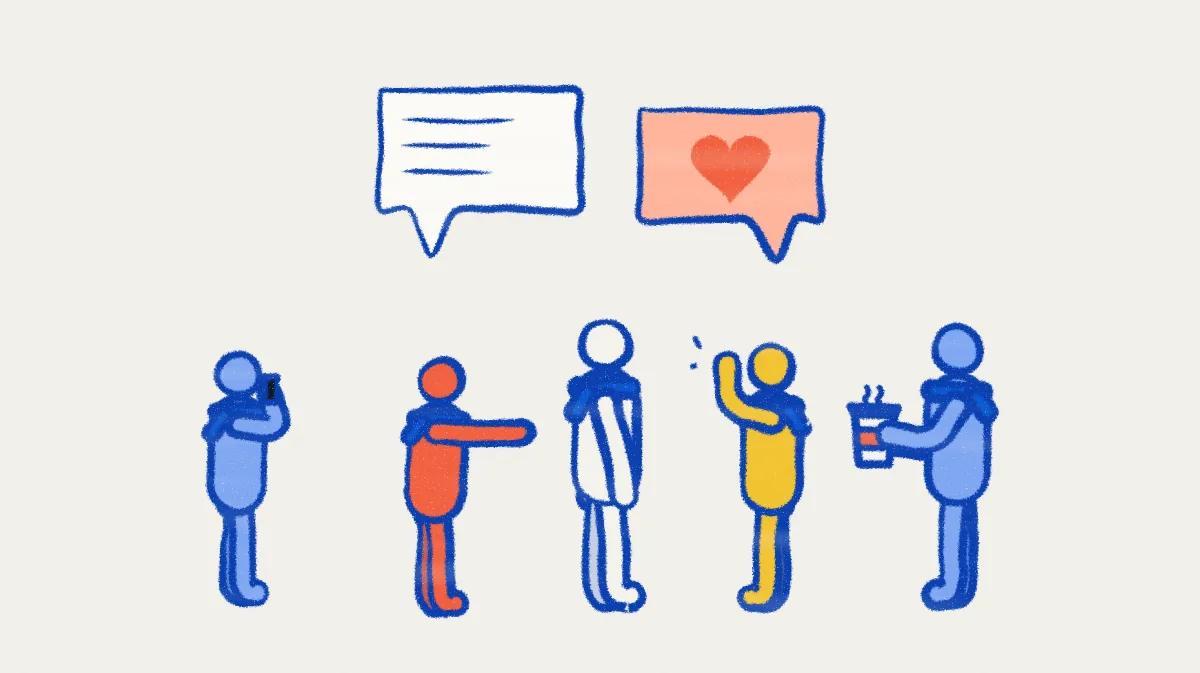 A
people row with two speech bubbles. The left half faces right and the right half faces left.
By default the group faces inward, which reads as a conversation. Set facing to left, right or alternate for a queue or a march, and "vary": false for identical heights. people reads best at a size of 160 to 320.
Show an audience with crowd
When the people are not the subject but the audience, draw them from behind with crowd. Rows step down from the back row, and highlight with share picks out a few:
{ "seed": 54, "clip": [60, 52, 1080, 569], "elements": [
  { "type": "panel", "x": 60, "y": 52, "w": 1080, "h": 569, "color": "blue" },
  { "type": "panel", "x": 330, "y": 110, "w": 540, "h": 260, "color": "paper" },
  { "type": "prop", "name": "lightbulb", "x": 600, "y": 240, "size": 190 },
  { "type": "crowd", "x": 60, "y": 470, "w": 1080, "rows": 3, "size": 130, "highlight": "coral", "share": 0.1 }
] }
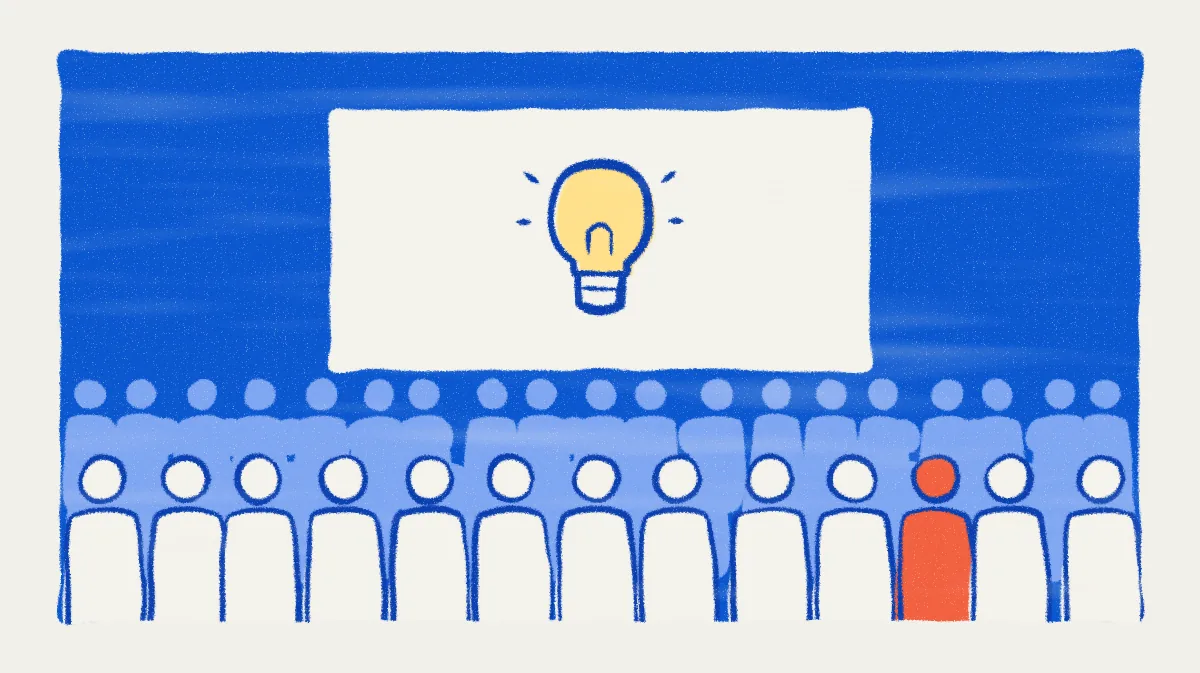 A crowd watching a screen. One in ten is picked out in coral.
y is the base of the back row, and each row steps size × 0.45 down. To sit a crowd on the bottom edge, use y of about 673 − (rows − 1) × size × 0.45.
Show a share with isotype
For “3 in 10 people” style statements, isotype draws a grid of pictograms and paints a share of them in the highlight colour:
{ "seed": 55, "elements": [
  { "type": "label", "text": "3 in 10 (sample share)", "x": 600, "y": 100, "anchor": "middle", "size": 20 },
  { "type": "isotype", "x": 180, "y": 320, "cols": 10, "rows": 2, "size": 150, "color": "tone", "highlight": "coral", "share": 0.3 }
] }
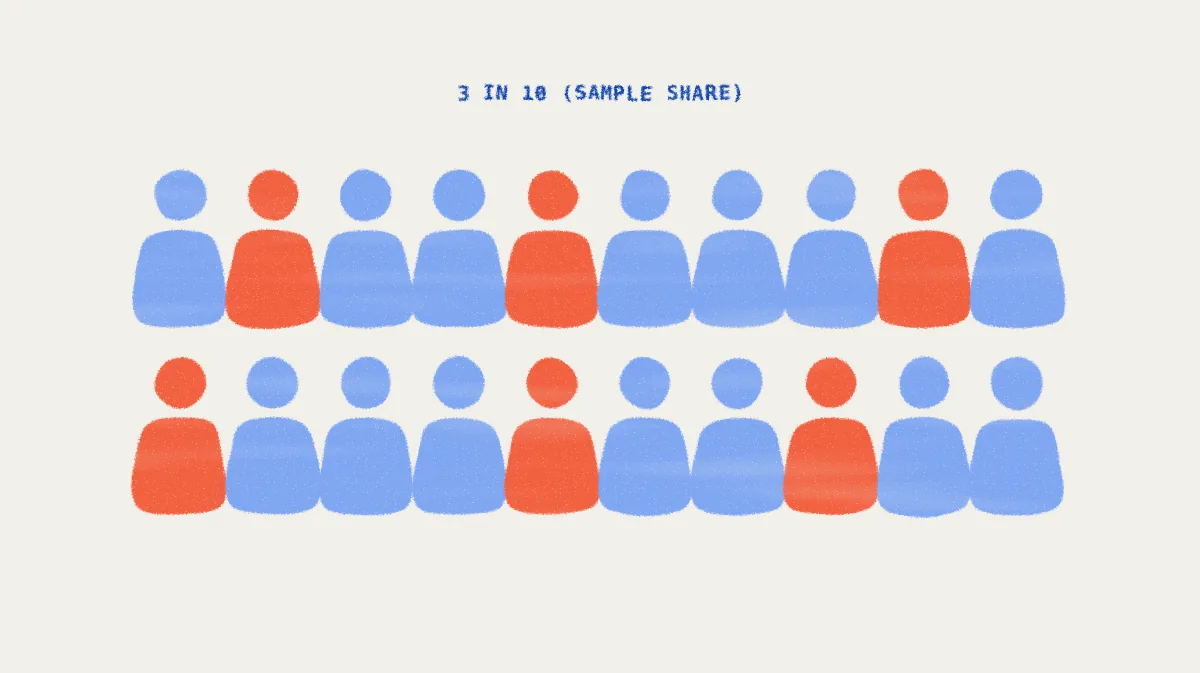
isotype with share 0.3: six of twenty in coral.
The highlighted ones are scattered by the seed, not grouped. Always take the share from your story and say where it comes from. For counts in rows, such as “80 walk, 55 take the bus”, use isochart, covered in hand-drawn charts from data.
Take care with sensitive stories
For stories about loss, disaster, illness or courts, people in a picture can feel intrusive. Levni’s guide for sensitive stories suggests the opposite of a crowd: one quiet object with a lot of space, such as an empty chair, a candle or a lit window, in blues only. An empty room says more than a crowd in distress.
Let an assistant cast the scene
With the Levni MCP server (setup), an assistant can choose poses for the story:
Use the levni MCP server. Call scene_guide once. Illustrate my article
"<title>" with faceless people only: one focal object from list_props,
two person elements whose poses act on that object, and nothing that
looks like a real person. Render with render_scene, fix the critic's
notes and save cover.png.
What to do next
See people in context in the dioramas gallery, where they stand in cafes and streets, and read isometric diorama illustrations to place them in a world. The full list of elements is on the features page, the drawings they can hold are in the library, and the code is on GitHub.
FAQs
Why use faceless people in illustrations?
A faceless figure stands for anyone, so readers do not read age, ethnicity or a particular person into it. It also avoids drawing a real person by accident, and it keeps a calm, consistent look across hundreds of articles.
Which poses can a Levni person take?
Fifteen: standing, walking, running, sitting, pointing, waving, raising-arm, holding, carrying, reading, phone, thinking, cheering, kneeling and leaning.
How do I draw a group of people?
Use the `people` element: a start point, a width, a number of persons and lists of poses and colours that are cycled. By default the left half faces right and the right half faces left, so the group faces each other.
How do I show a share of people, like 3 in 10?
Use `isotype` with `cols`, `rows` and `share`. A share of the pictograms is drawn in the highlight colour. Take the share from your story and never make one up.
Can I draw a specific real person?
No. Levni draws people only as faceless pictograms by design. To refer to a real person, draw an object that stands for them, such as a microphone for a speaker or an empty chair.