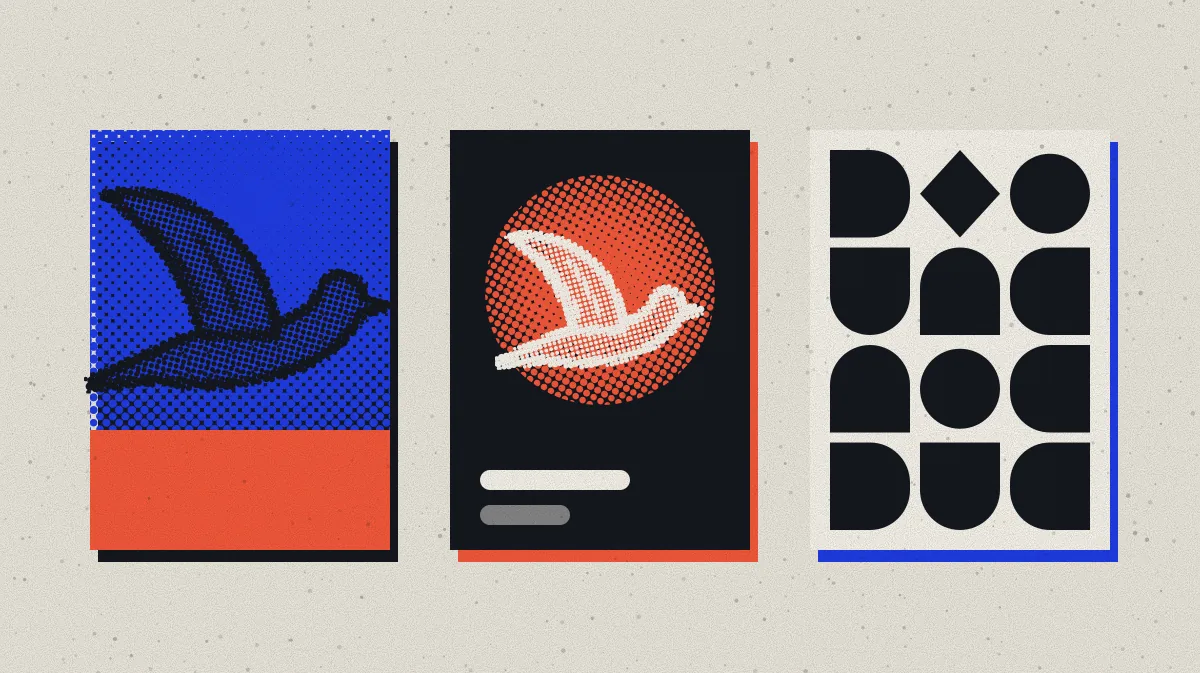
A branding poster series is what a studio posts when it launches an identity: a handful of tall posters that share a mark, a palette and a typeface, each with one big word. Making one by hand takes days of nudging type and textures. Asking an image model for one gives you invented letters and colours that drift from poster to poster.
You can write one as JSON instead. This guide uses Levni, an open-source illustration engine, to make eight 1200 by 1600 posters from a name, a drawing, a few colours and a few words. The headlines are real type, drawn from open fonts, so they are spelled the way you wrote them. There is no image model, no API key and no cost per image.
You need Node 20 or newer and about ten minutes. The brand is made up: Kumru, a coffee roaster in Izmir. Nothing here is a real company. For the sister feature that makes one board instead of a series, see the brand board guide.
Install Levni
npm install @levni/levni
Posters and the type element arrived in Levni 0.3.0. The npm package is still at 0.2.0, which has no levni poster command, so until 0.3.0 is published install straight from GitHub:
npm install github:Levni-Dev/levni
Once 0.3.0 is on npm, the first command is all you need. The command you will use is levni poster <spec.json> <out-dir>. It is deterministic: the same spec gives the same posters, speck for speck.
Pick a mark and four inks
The mark is a drawing from the library. It is halftoned, echoed and printed on the posters, so choose a bold silhouette that survives being made of dots. Search by word:
npx @levni/levni list dove
Kumru uses dove. Then choose inks. Give up to six colours as hex. The darkest becomes the ink for type and shapes, the lightest becomes the paper, and the others are accents. Four is plenty: one dark, one light and two that work hard.
Write the brand spec
Save this as kumru.json:
{ "brand": { "name": "Kumru", "tagline": "Slow coffee for fast mornings, roasted in Izmir", "mark": "dove",
             "inks": ["#14181F", "#1F3BE0", "#F0573A", "#F1EEE6"], "words": ["Roast", "Pour", "Share", "Brew"] } }
name is required and can be up to 24 characters. tagline is one sentence, wrapped and set small. words are the headlines, one per poster, in order. They cycle if you have fewer words than posters, and Turkish casing is handled for you. brand.url, brand.year and brand.seed change the credits row and the texture.
Render the series
npx @levni/levni poster kumru.json posters/
You get poster-01-split.png to poster-08-launch.png and a contact sheet, series.png.
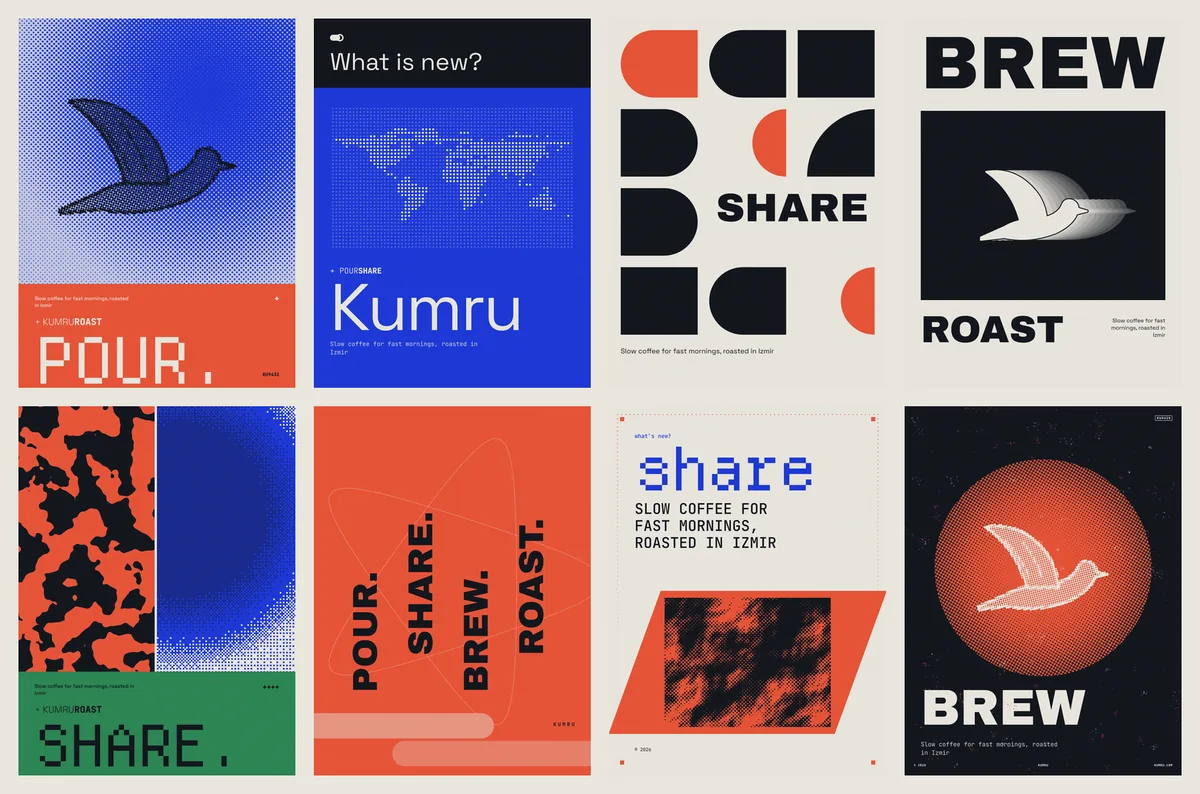 The Kumru series from the spec above. One mark, four inks, four words.
The eight templates are split, map, bauhaus, echo, camo, vertical, summit and launch. Use only to pick some and count to make more, up to 24, which cycles the templates and the words:
{ "brand": { "name": "Kumru", "mark": "dove" }, "only": ["launch", "echo", "split"] }
Understand type from real fonts
The big words are not text in an image and not a picture of text. The type element draws each letter as a path, using fonts bundled with Levni: Space Grotesk, Archivo Black, JetBrains Mono and Departure Mono, a pixel face. Because the glyphs are paths, a poster looks the same on every machine, at any size, with no font installed. The fonts are under the SIL Open Font License 1.1, and their files sit in the repository’s fonts/ folder.
Here is a specimen, and the scene that drew it:
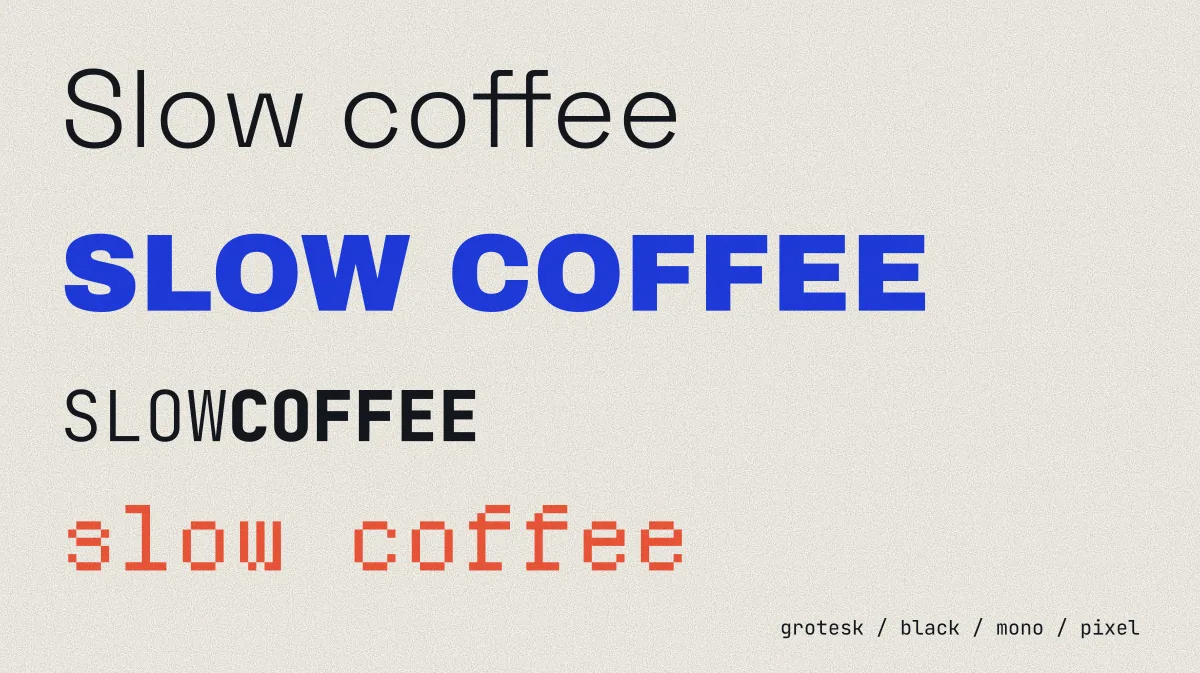 Four faces from one element.
font picks the face; weight moves the variable ones.
{ "seed": 2, "finish": "soft", "background": "#F1EEE6", "elements": [
 {"type":"type","text":"Slow coffee","x":60,"y":70,"size":110,"font":"grotesk","weight":300,"color":"#14181F"},
 {"type":"type","text":"SLOW COFFEE","x":60,"y":235,"size":110,"font":"black","color":"#1F3BE0"},
 {"type":"type","text":"SLOW**COFFEE**","x":60,"y":390,"size":70,"font":"mono","weight":300,"boldWeight":800,"color":"#14181F"},
 {"type":"type","text":"slow coffee","x":60,"y":505,"size":90,"font":"pixel","color":"#F0573A"},
 {"type":"type","text":"grotesk / black / mono / pixel","x":1140,"y":620,"size":20,"font":"mono","weight":400,"align":"right","color":"#14181F"}
]}
font is grotesk, black, mono or pixel, or a path to your own .ttf or .otf. weight works on the variable fonts, tracking and leading set the spacing, and **bold** switches weight inside a line, which is how KUMRU**ROAST** gets its two voices. type is an ordinary element, so you can use it in any scene, not only posters.
Change the brand, keep the system
The cheapest way to see whether a system holds is to feed it another brand. Here is Zeytin Evi, an olive oil maker, with a different mark, green and amber inks and its own words:
{ "brand": { "name": "Zeytin Evi", "tagline": "Cold-pressed olive oil from one family grove", "mark": "olive-branch",
             "inks": ["#1E2A1B", "#5E7F3A", "#E8A33D", "#F3EEDD"], "words": ["Press", "Pour", "Taste", "Share"] } }
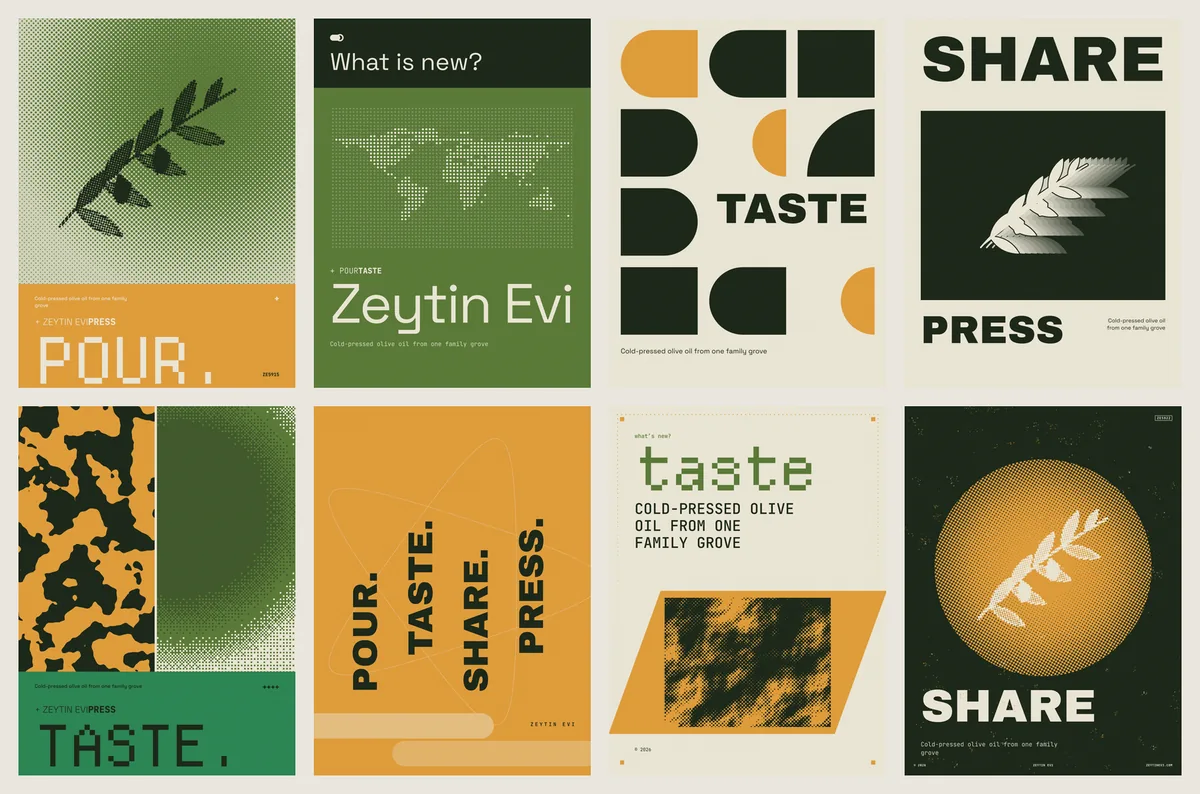 The same eight templates, a new mark and new inks.
Nothing else changed, and every poster followed: the halftone, the dot-matrix map, the module grid and the camouflage all take their colours from inks. Keep a few of these side by side and you can show three directions in the time it takes to pour a coffee.
Write one poster by hand
A template is a starting point. Each poster is a normal scene on a 1200 by 1600 canvas, built from elements that you can use yourself: amtone for halftone, block for flat colour, type for words, and camo, grain, shapegrid, echo, dotmatrix and furniture for the rest. This one is a made-up ferry poster written from scratch. Save it as ferry.json and run npx @levni/levni render ferry.json ferry.png:
{ "canvas": [1200, 1600], "finish": "soft", "seed": 5, "background": "#F1EEE6", "grain": 0.1, "elements": [
 {"type":"amtone","x":0,"y":0,"w":1200,"h":1100,"source":"radial","cx":600,"cy":520,"radius":720,"from":0.95,"to":0.05,"cell":12,"angle":45,"colors":["#1F3BE0"]},
 {"type":"amtone","source":"prop","prop":"lighthouse","x":600,"y":560,"size":700,"cell":9,"angle":15,"colors":["#14181F"]},
 {"type":"block","x":0,"y":1100,"w":1200,"h":500,"color":"#14181F"},
 {"type":"type","text":"NIGHT\nFERRY","x":70,"y":1160,"w":1060,"h":330,"fit":"box","font":"black","color":"#F1EEE6"},
 {"type":"type","text":"Slow ferries across the Bosphorus","x":70,"y":1530,"size":28,"font":"mono","weight":400,"color":"#F0573A"}
]}
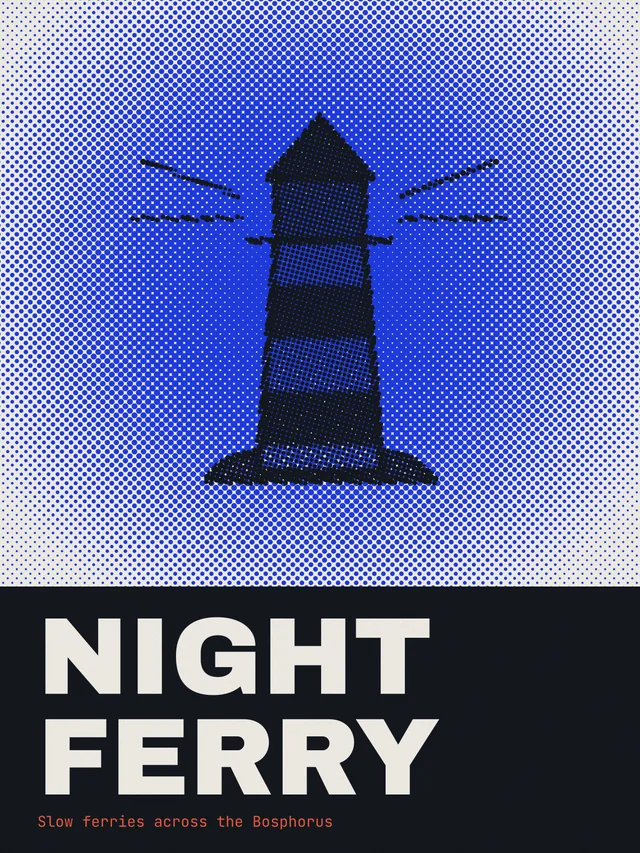 A poster written by hand from four elements.
The first amtone is the glow, a radial halftone from a pale edge to a deep centre. The second turns the lighthouse drawing into dots, with ink darker where the drawing is darker. block is a crisp flat colour with no hand wobble, and type with fit: "box" sets the words as large as the box allows.
Edit one poster from the series
Every poster in a series is a scene, so you can pull one out, change it and render it alone. From code:
import { expandPosters } from '@levni/levni';
import { readFileSync, writeFileSync } from 'node:fs';

const spec = JSON.parse(readFileSync('kumru.json', 'utf8'));
const launch = expandPosters(spec).find((p) => p.template === 'launch').scene;
writeFileSync('launch.json', JSON.stringify(launch, null, 2));
Open launch.json, change a word or an ink, and render it with npx @levni/levni render launch.json launch.png.
Ask an agent to make the series
The render_poster tool in the Levni MCP server takes the same spec. Add the server once. render_poster needs 0.3.0, so until it is on npm point the client at the GitHub version:
claude mcp add levni -- npx -y github:Levni-Dev/levni mcp
Once 0.3.0 is on npm, claude mcp add levni -- npx -y @levni/levni mcp is enough.
The tool takes spec, an out_dir for the files, scenes: true to return each poster as scene JSON, preview for a contact sheet image, and guide: true to return the poster format instead of rendering. A good agent reads the guide first, searches the library for a mark, renders, looks at the contact sheet and fixes what it sees. Paste this into Claude or Codex:
Use the Levni tools. First call render_poster with guide: true and read the
poster format. Then call list_props to find a bold, simple drawing for the mark
of a brand called "Tuz", a bakery in Ayvalik: try bread and bread-loaf. Make a
poster series with render_poster: the tagline is "Bread baked slowly, by the
sea", the inks are #243B53, #E8B04A, #C8553D and #F7F1E3, and the words are
Knead, Rest, Bake, Share. Write the files to a folder called tuz-posters. Look
at the contact sheet. If one poster reads badly, call render_poster again with
scenes: true, fix that scene, and render it with render_scene. Tell me the final
spec.
Tuz is made up too. The agent returns the spec at the end, so you can keep it in your repository and render the series again later.
Check the result
Look at the series before you show it. Four things can go wrong. A long name shrinks the wordmark on the map poster, so shorten it. A mark with thin detail turns to noise as halftone, so try another drawing or another variant. Two inks that are too close flatten the palette, so make the darkest very dark and the lightest very light. And a long tagline wraps onto many lines, so keep it to one short sentence.
When a poster is wrong, fix it in its scene and not in the image. Because the render is deterministic, you can change one field and everything else stays where it was.
What to do next
Put the same brand on a single sheet with a brand board, add seals and stickers to match, or read the launch post for the 0.2 brand assets for the dither and gradient pieces. See more posters in the gallery, and browse the Levni library for a mark.
Reference and examples. Read the poster reference (layouts and type); see finished work on the features page and in the gallery.
FAQs
What is a branding poster series?
It is a set of posters that share inks, type and a mark, so they read as one identity. Studios post them when they launch a brand, usually with one big word per poster.
How many fields do I need?
Only `brand.name` is required. Add a `mark` (a library drawing), up to six `inks` as hex colours, a `tagline` and a list of `words` for the headlines. Everything else has a default.
Which fonts does it use, and can I use my own?
Space Grotesk, Archivo Black, JetBrains Mono and Departure Mono, all under the SIL Open Font License and bundled with Levni. The `type` element also takes a path to your own .ttf or .otf file as `font`.
Can I edit one poster after the series is made?
Yes. Every poster is a normal scene. `expandPosters` returns them as JSON, and the MCP tool does the same with `scenes: true`. Edit one and render it with `levni render`.
Can an agent make the series?
Yes. The `render_poster` tool in the Levni MCP server takes the same spec, writes the posters and returns a contact sheet. With `guide: true` it returns the poster format so the agent can read it first.

Ortak Alan is a Turkish publication that draws its article covers with Levni, and makes Levni. The engine is on GitHub.