The Levni Folio is an open library of more than 1,600 hand-inked drawings: a rocket, a çay glass, a lighthouse, a server rack, a tulip. Every agent that uses Levni, every cover it draws and every free maker on this site reads from it. So far one studio drew almost all of it. This guide shows how to add yours, from an empty file to a merged pull request with your name on it.
It takes about an hour for a first drawing, most of it spent drawing.
What a drawing is
A Folio drawing is not a PNG. It is one JSON file: a name, a shelf, some tags, your name, and one or more variants, each a short list of SVG paths in a 0–100 box. Here is a real one, a watering can, written for this post:
{
  "name": "watering-can",
  "category": "home",
  "tags": ["garden", "water", "plant", "gardening", "sulama", "bahçe"],
  "author": "Your Name",
  "variants": [
    { "note": "side view, spout to the right", "paths": [
      { "d": "M34 38 Q47 16 60 38", "fill": "none", "stroke": "ink", "weight": 9 },
      { "d": "M68 56 L88 34", "stroke": "ink", "weight": 9 },
      { "d": "M84 26 L96 38 L90 42 L80 32 Z", "fill": "coral", "stroke": "ink", "weight": 6 },
      { "d": "M24 44 Q24 38 30 38 L64 38 Q70 38 70 44 L68 82 Q68 86 64 86 L30 86 Q26 86 26 82 Z", "fill": "tone", "stroke": "ink", "weight": 9 },
      { "d": "M27 58 L69 58", "stroke": "ink", "weight": 5 },
      { "d": "M27 66 L68 66", "stroke": "ink", "weight": 5 }
    ] }
  ]
}
Three things make this format work for everyone downstream:
- Colours are names, never hex.
ink,blue,tone,coral,mustard,green,paperand their tones. Because of that, a style pack or your own brand inks can recolour every drawing in the library in one line. - Paths are plain SVG. Levni redraws each one with a pressure brush, prints it from a slightly misaligned riso plate and adds paper grain. You draw clean shapes; the engine adds the hand.
- The box is always 0–100. Any scene can place your drawing at any size, and it lines up with the 1,600 others.
Step 1: pick an object nobody has drawn
Search the Library first, in English or Turkish. Then pick one object, not a scene: a watering can, not a garden. The Folio has a few hard rules, and they exist so that anything in it is safe to reuse anywhere:
- your own drawing (drawing in the spirit of a style is welcome, tracing a photo or an icon set is not)
- no faces and no hands: people appear only as faceless pictograms
- no logos or anything that reads as one (why: BRAND_LOGOS.md)
- no text inside the drawing
- one object, one idea
Step 2: draw it in the house style
The full rule book is the Folio guide. The parts that matter most for a first drawing:
- Size. The object fills about 70–85 of the 100 box, centred near (50, 50), inside 4..96.
- Line. Outlines
weight8–10, details 4–6. Do not mix many weights. - Colour. One tone fill plus at most two accents. Two inks plus paper is the house look.
- Detail. 2–24 paths. Shrink your drawing to 120 px and squint: if an area goes dark, it is too busy.
- Space. Keep at least one outline-width of paper between separate parts, or they read as a smudge at small sizes.
You can draw the paths by hand in any vector tool and copy the d attributes, write them directly, or ask a chat model to draft them from a description. The repository has a copy-paste prompt for that. If a model helped, you are still the one who checks every path, and you say so in the pull request.
Step 3: name it and tag it
Names and tags are how people and agents find your drawing. The Library search, levni list <word> and the MCP list_props tool all read them.
- Name what it shows, in lowercase English kebab-case:
floppy-disk, notsave. Related objects share the group word first:book-open,book-closed. - Tag it with 4–8 words, mixing English synonyms and the Turkish words:
garden,water,plant,sulama,bahçe. Do not repeat the name, and add the stories the object fits rather than loose neighbours. - Write a short note per variant, 3–12 words about what that variant shows:
side view, spout to the right. A model that cannot see images uses it to pick the right one.
Step 4: check it with one command
Clone the repository, install, and run the check on your file:
git clone https://github.com/Levni-Dev/levni.git && cd levni
npm install
npx levni add my-drawing.json --sheet check.png
levni add validates the file against the schema and the naming rules, writes it to library/props/, and draws a contact sheet: every variant on paper and on a blue panel. This is the real sheet for the watering can above:
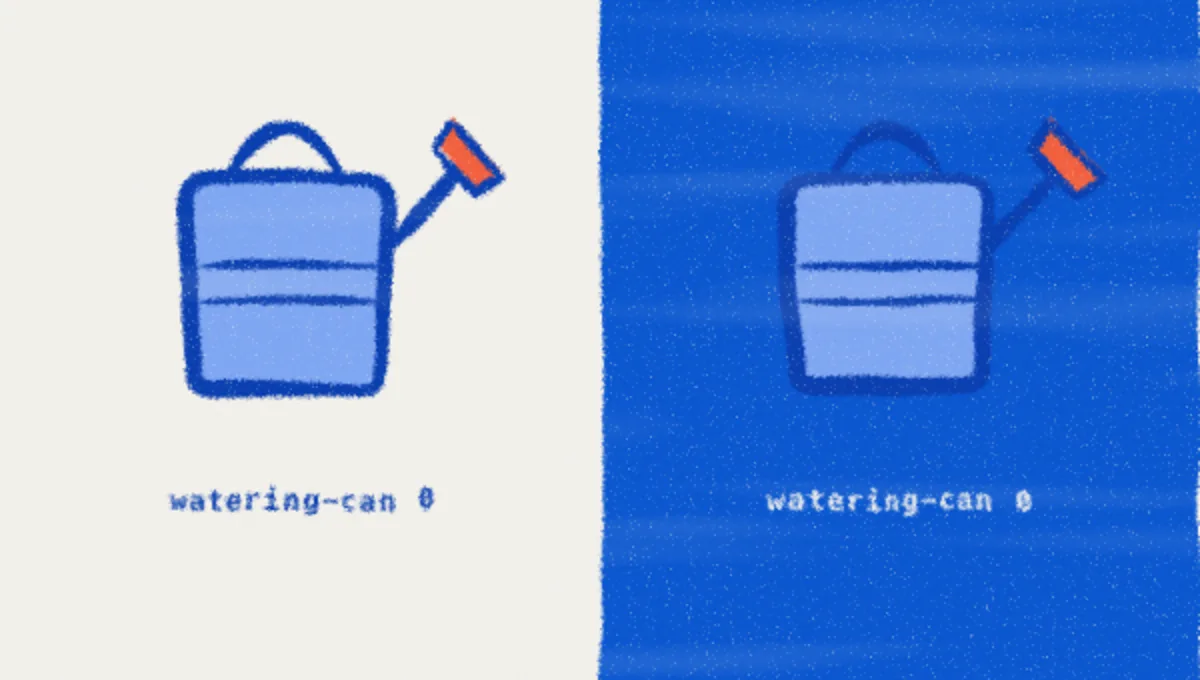
The command prints new for each drawing it adds, note lines for house-style hints, and skip lines for anything that breaks a must-rule. Fix every skip. Fix the note lines or explain them. Then look at the sheet at small size: does it still read as a watering can on both grounds?
Before you open the pull request, run the whole suite once:
npm test
Step 5: open a pull request
Commit your JSON file and open a pull request against main. The pull request template asks a few questions: is it your own work, did a model help, does the sheet look right. Attach check.png.
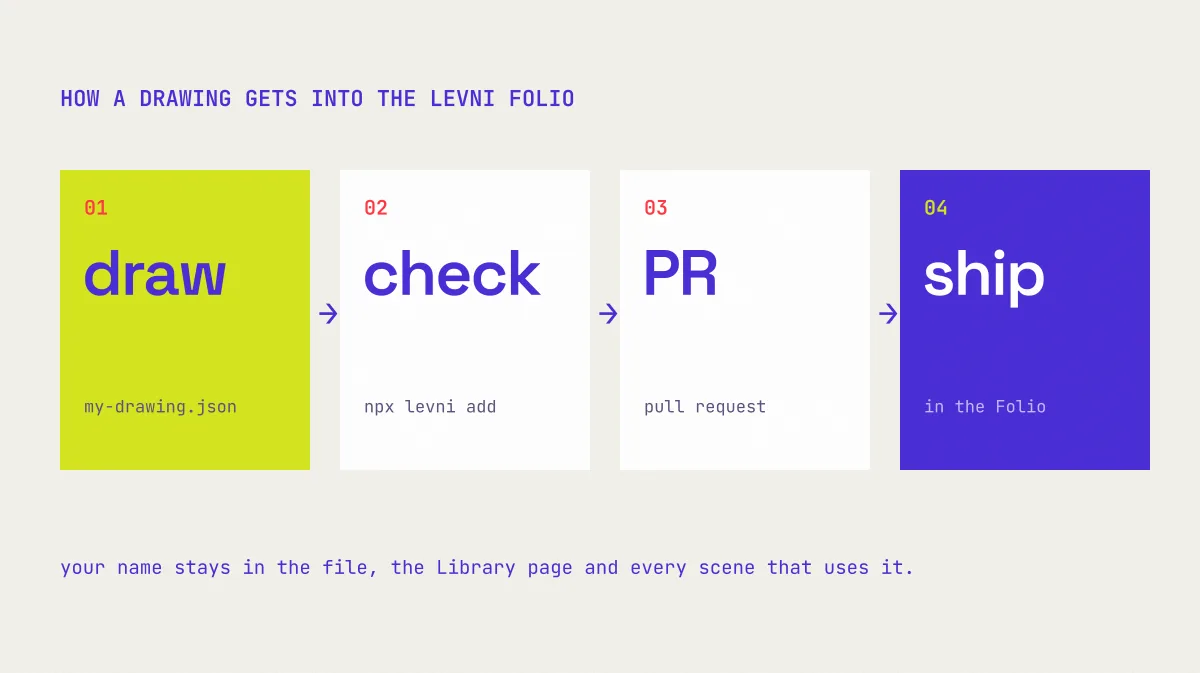
Automatic checks run on every pull request: the test suite validates the whole Folio and draws every variant. A person then reviews it against the house style, usually with one or two small notes. Once it is merged, your drawing is in the Folio: in the Library, in every agent’s search, in the editor and the free makers, and in the next npm release.
What you get
Your name stays in the drawing’s author field. It shows up on the drawing’s Library page and travels with the file wherever it is used. The drawing is released under CC BY 4.0, so anyone can use it, commercially too, as long as they credit it. That is the trade: you give one object to the commons, and the commons keeps your name on it.
If you cannot draw it
That is fine too. Open a prop request and describe the scene that needs the object and the angle you want. Requests decide what gets drawn next, and someone who likes drawing watering cans may pick it up.
There are four other ways to add to Levni, from palettes to brand kits, on the community page. And if you want to know why we care about this at all, the manifesto explains it.
FAQs
Do I need to be an illustrator to contribute?
No. A drawing is a short JSON file of SVG paths in a 0–100 box. If you can sketch simple shapes and read a little SVG path syntax, you can add an object. Many good props have fewer than ten paths.
Can I use AI to write the path data?
Yes, if you direct and check the result yourself. Say so in the pull request. The drawing still has to follow the house rules: your own work, no logos, no faces, no hands, no text.
What licence do contributed drawings use?
CC BY 4.0, like the rest of the Levni Folio. Anyone can use your drawing, commercially too, with credit, and your name stays in the drawing's author field.
How long does review take?
Automatic checks run on every pull request and render your drawing on paper and on a blue panel. A person then looks at it against the house style. Small, well-checked props are the fastest to merge.
What if I cannot draw the object myself?
Open a prop request on GitHub and describe the scene that needs it. Requests decide what gets drawn next.
Ortak Alan is a Turkish publication that draws its article covers with Levni, and makes Levni. The engine is on GitHub.