Reference
Brand boards
A brand board is one image with many tiles: mark, wordmark, palette, pattern, social card, sticker, merch, web page, business card. It is the picture designers post to show an identity.
Try it in your browser first: the free brand board generator on levni.dev. Your agent can draw boards for free through the MCP server (render_board).
levni board <spec.json> <out.png>
API: import { renderBoard, expandBrand } from 'levni'; await renderBoard(spec, 'board.png', { baseDir }). Deterministic like a scene. Examples: examples/board-feneri.json (brand shortcut only, six lines) and examples/board-kumru.json (every tile placed by hand, scenes in examples/board-kumru/).
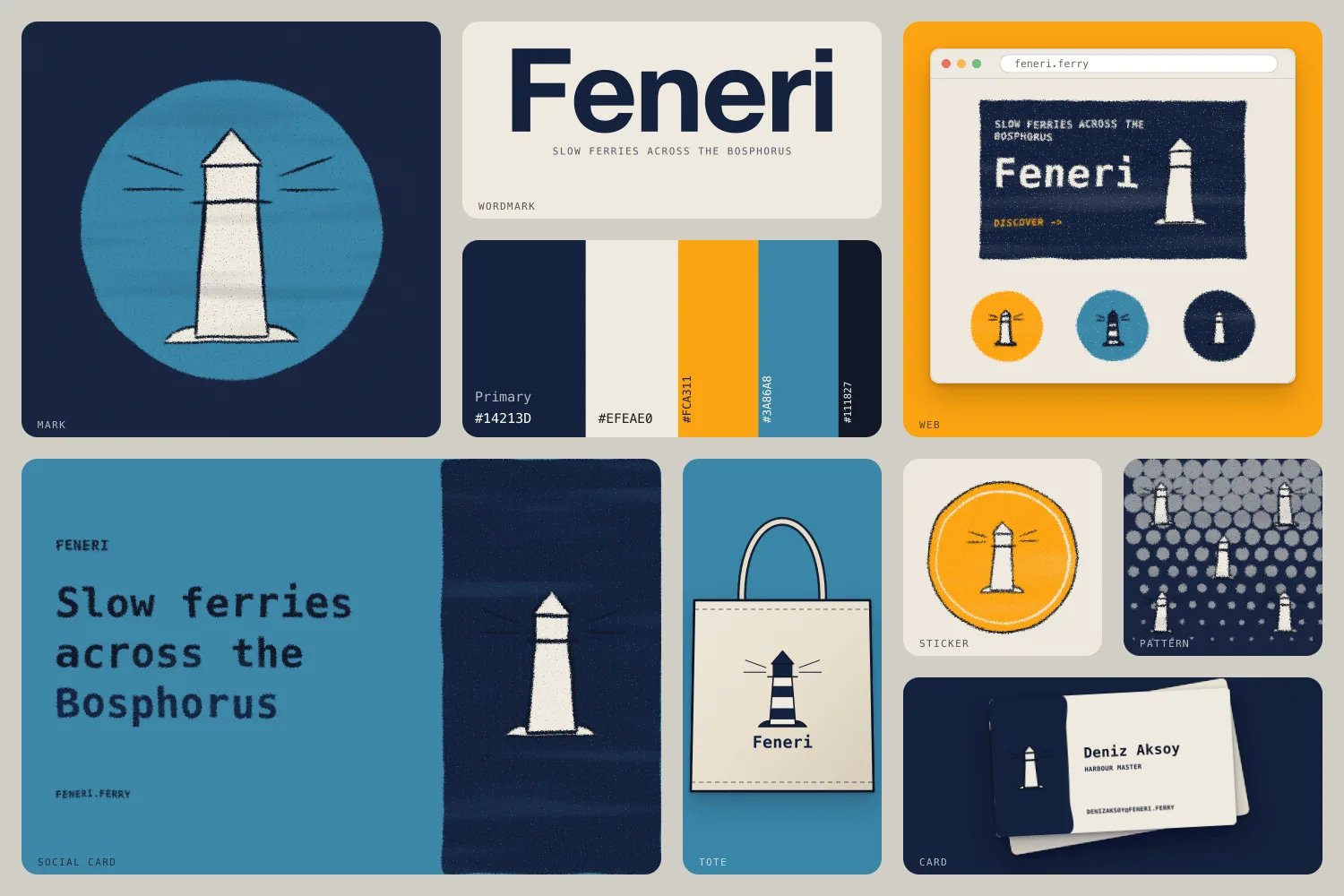
examples/board-feneri.json: a name, a tagline, a mark from the library and four inks.The MCP tool render_board takes the same spec, returns a 900 px preview and, with out, the PNG. guide: true returns this format as text. See MCP server.
The one-call way: brand#
{ "brand": { "name": "Feneri", "tagline": "Slow ferries across the Bosphorus", "mark": "lighthouse",
             "inks": ["#14213D", "#FCA311", "#3A86A8", "#EFEAE0"] } }
expandBrand(brand) turns that into a full board spec (a plain JSON object, so you can print it, edit it and render it): mark, wordmark, web page in a browser, palette, social card (1200x630), tote bag, sticker, pattern and a tilted business card. Fields written next to brand (canvas, background, gap, quantize, ...) override the generated ones.
brand field |
default | meaning |
|---|---|---|
name |
required | brand name, up to 40 characters |
mark |
required | a prop name or tag (levni list [query]): the symbol of the brand. Unknown names throw |
tagline |
none | one line (up to 90 characters). Shown on the wordmark, web hero, social card (wrapped, auto-sized) and card |
inks |
slate, terracotta, mustard on cream | up to 5 colours as #RRGGBB. The darkest becomes the ground and text colour (a bright one is darkened for grounds and kept as an accent), a very light one becomes the paper, the others become the accent and highlight. Missing ones get house defaults |
font |
serif |
wordmark face: serif (italic), sans (heavy) or mono |
url |
<name>.com |
browser bar, social card, business card |
person |
none | { name, role }: the business card is for a person (else it carries the brand) |
props |
none | up to 3 more prop names for the web page's product row (default: the mark in three colourways) |
seed |
from the name | changes the crayon texture everywhere |
finish |
crayon |
soft for clean edges |
captions |
true |
false hides the small tile labels |
The marks are drawn in one ink on each ground (paper on dark, the deep ink on light), outlines use a dark shade of the primary ink, and the board's style re-inks every scene, so the whole board holds to your colours.
Board fields#
| field | default | meaning |
|---|---|---|
canvas |
[1800, 1200] |
board size in px (200..6000) |
background |
#E4DECF |
colour behind the tiles (name or #hex) |
grid |
{cols: 4, rows: 3} |
cell grid (1..12 each) |
gap, margin |
24, gap |
space between tiles / around the board |
radius |
18 |
tile corner radius |
style |
none | { blue: "#hex", coral: ..., ink: ... }: re-inks every scene tile (house colour names, as in style of a scene). A scene's own style wins |
finish |
none | crayon or soft for scene tiles that do not set their own |
ink |
#1C1A16 |
outline colour of the tote mockup |
t |
none | animation time 0..1 passed to every scene tile |
quantize |
false |
write a 256-colour PNG (about a third of the size) |
tiles |
required | up to 60, see below |
Tiles#
Place a tile with at: [col, row, colspan, rowspan] (grid cells) or rect: [x, y, w, h] (pixels). Common: bg, caption (small mono label), radius.
type |
fields |
|---|---|
scene (default) |
scene: a scene object or a path to a scene JSON (relative to the spec). mockup: none (default), browser (chrome bar, url), card (business card with a spare behind; ratio, stack: false, backColor), tote (bag, bagColor; the print renders on a transparent background), phone (bezel and notch). tilt: degrees, -12..12, turns the whole mockup (about -3 suits a card). fit: auto (default) or none. seedOffset varies the seed |
palette |
colors: up to 12 of "#hex" or {hex, name?, weight?}; layout: strip (columns) or stack (rows); pad. Hex labels in mono, text colour picked for contrast |
type |
text (\n for lines, up to 6), family: serif, sans, mono or a font name, italic, weight, tracking (hundredths of an em), size (measured and fitted by default), align (left), sub (mono subtitle), bg, color |
Scenes fit their tile#
A scene tile is reflowed into its tile: the scene is authored for the canvas it names (canvas or format, else the normal 1200x673) and drawn through compose() with reflow at the tile's pixel size (inside a mockup: the screen, card face or print area). So you can change canvas, grid or gap and the scenes follow, no edits. Scene reflow and title work as usual. A scene authored with a canvas close to its tile's shape reflows best (the brand shortcut does this). fit: "none" (or "reflow": false in the scene) draws it on the tile canvas exactly as written.
Fonts#
The PNG rasteriser (librsvg) ignores @font-face, so only installed fonts render. serif, sans and mono are stacks that list what ships with macOS (Georgia, Helvetica Neue, Menlo), Windows (Times New Roman, Arial, Consolas), and Linux (Liberation, DejaVu from fonts-liberation / fonts-dejavu), then the generic family, so something always renders. A custom family name falls back to the sans stack when it is not installed. Type tiles are measured with the real font, so any face fits its tile.
Board recipes#
{ "canvas": [1200, 800], "grid": { "cols": 3, "rows": 2 }, "tiles": [
  { "at": [0, 0, 1, 2], "scene": { "elements": [{ "type": "prop", "name": "dove", "x": 600, "y": 336, "size": 420 }] }, "caption": "Mark" },
  { "at": [1, 0, 2, 1], "type": "type", "text": "Kumru", "italic": true, "sub": "Coffee roasters", "bg": "paper" },
  { "at": [1, 1, 1, 1], "scene": "social.json", "mockup": "phone" },
  { "at": [2, 1, 1, 1], "type": "palette", "colors": ["#2D4A7C", "#F6F0E4", "#E8734A"] } ] }
Scenes in the grid above are written for the normal 1200x673 canvas and reflow into each tile.